

Handwriting remains one of the most natural ways to capture ideas, sketch concepts, and think through problems on the page. The friction appears when you need to convert handwritten notes to text so you can search, edit, or share them across your digital tools.
E-ink paper tablets bridge that gap by letting you write on tablet like paper while turning your handwriting into digital text, keeping the experience low-distraction and focused. With handwriting-to-text conversion, you keep the personal feel of pen on screen, while your notes become easier to file, reorganize, and reuse.
In this guide, we'll look at how e-ink writing tablets handle this process and how to fine-tune your device to achieve reliable and accurate conversions from your handwritten pages. Let’s dive in.
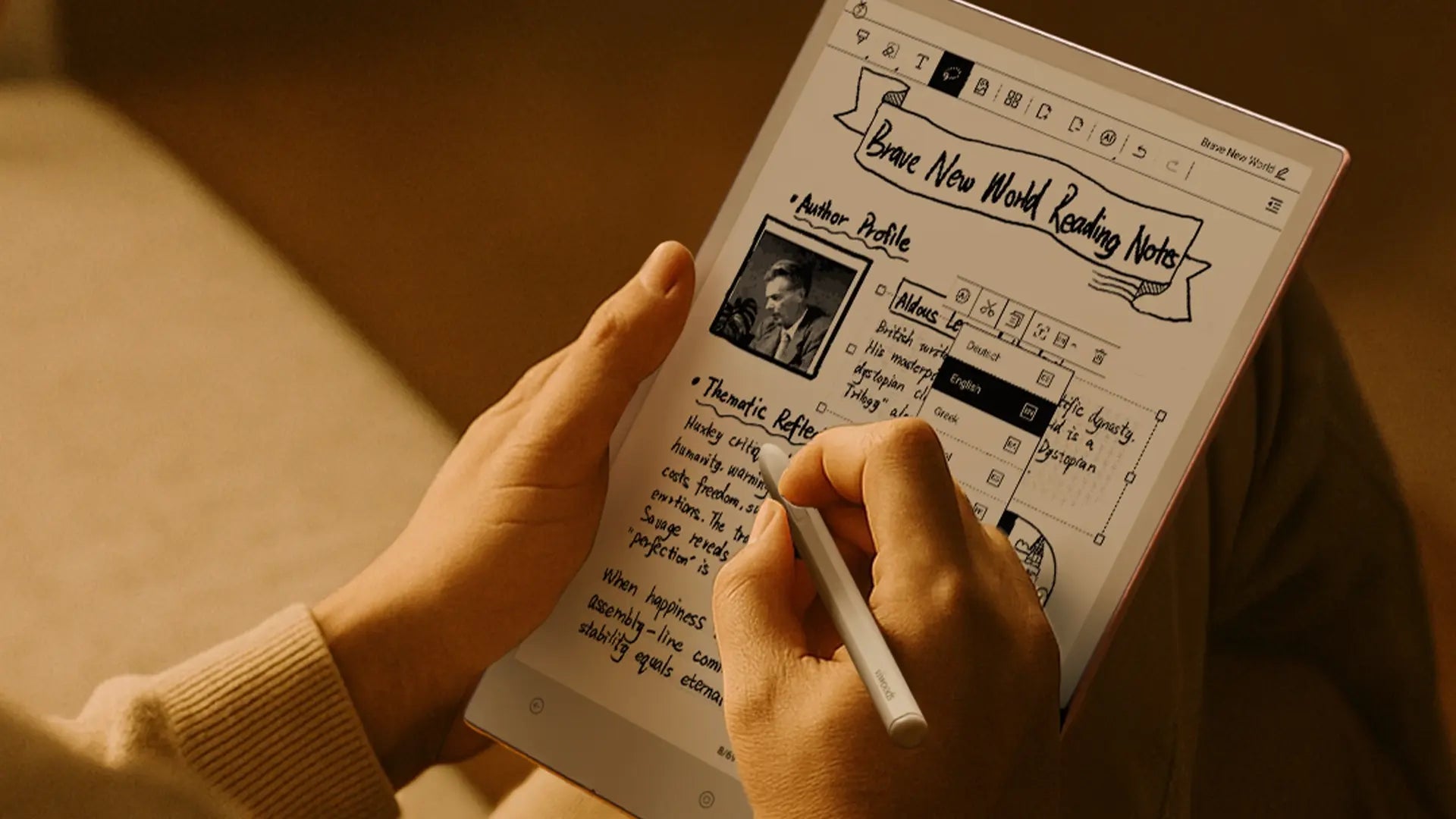
How to Convert Handwritten Notes to Text on E-Ink Writing Tablets
E-ink writing tablets are a popular choice among tablets that convert handwriting to text because they blend the tactile feel of handwriting with the convenience of digital technology. Their ability to convert handwritten notes into text is powered by Optical Character Recognition (OCR), a technology that interprets the written word and transforms it into digital text. Here's how they make this process seamless.
The Role of OCR Technology
At the core of handwriting-to-text conversion is OCR technology. When you write on an e-ink tablet, the built-in OCR software scans the strokes of your handwriting and analyzes their shapes and patterns. This process allows the software to match each handwritten character with its corresponding digital text. The cleaner and more consistent your handwriting, the easier it is for the OCR to convert it accurately.
How E-Ink Screens Enhance the Process
Unlike traditional LCD screens, e-ink displays use microcapsules that replicate the appearance of ink on paper. This paper-like quality enhances the writing experience, making it feel more natural and focused. The glare-free e-ink screen ensures you can write comfortably in various lighting conditions, essential for accuracy when converting handwriting. Additionally, the high contrast of e-ink screens helps the OCR software differentiate between your handwriting and the background, resulting in clearer, more precise character recognition.
Bringing Analog and Digital Together
E-ink tablets combine the best of both worlds. They preserve the personal feel of handwritten notes while providing the benefits of digital text — searchability, editability, and easy sharing. The seamless integration of OCR with e-ink screens allows users to effortlessly turn handwritten notes into editable digital text, streamlining the process of organizing and managing ideas.

Enhance Handwriting to Text Conversion on E-Ink Paper Tablets
To get the most out of handwriting-to-text conversion on your e-ink tablet, it's important to understand the key settings and best practices that improve accuracy and efficiency. By making adjustments and following these tips, you can improve the conversion of your handwritten notes into text. Here's how to optimize the experience.
1. Adjusting Device Settings for Better Accuracy
E-ink tablets typically offer customization options for pen settings, such as stroke thickness and color, which can help the OCR software better distinguish between your handwriting and the background. Experiment with these settings to find the optimal configuration for your handwriting style. If you want to see how a dedicated EMR pen is tuned for control and consistency on Viwoods paper tablets, read Introducing Stylus Pro.
Additionally, some digital notebooks allow you to adjust the contrast between the ink and the screen. Increasing the contrast can help your handwriting stand out more clearly, improving the accuracy of the conversion process. If the device offers any additional OCR-specific settings, like smoothing or handwriting correction features, enable them to enhance the text output.
2. Writing Style Considerations
The accuracy of OCR depends on your handwriting, so aim for consistent and clear writing for the best results. If you're used to cursive or highly stylized handwriting, it's a good idea to slow down a bit to make each letter clearer and more distinct. The more uniform the letter shapes, the easier it is for the OCR software to recognize and convert them.
Additionally, make sure your letters don't overlap and leave enough space between words. Crowded or overlapping strokes can confuse the OCR software, leading to errors in the final text. By focusing on clarity and consistency, you'll improve the overall accuracy of the conversion.
3. Handling Mixed Content
Many users tend to mix text with drawings, sketches, or diagrams in their notes. While e-ink tablets excel at handling both, it's important to remember that OCR software is primarily designed to recognize text, not images or drawings. To improve conversion accuracy, ensure text is separate from any non-text content, such as sketches, by maintaining adequate spacing. Or, if you need to annotate or draw within your notes, try using separate layers for these elements.
4. Editing and Correcting Converted Text
No system is perfect, and sometimes the OCR might not convert your handwriting flawlessly. It's especially true for unusual handwriting styles, unique abbreviations, or mixed content. Luckily, most e-ink tablets come with built-in editing tools that allow you to correct any mistakes quickly. After the conversion, review the text for errors, such as misinterpreted characters or omitted words, and manually adjust them as needed.
Many tablets also offer features like auto-correction and suggested edits to improve accuracy over time, making the process easier with continued use. Some devices even learn from your handwriting and become better at recognizing it with every use.
Maximizing Your Handwriting-to-Text Experience
Keep practicing and adjusting your approach to get the most accurate handwriting-to-text conversion. Over time, you'll find the settings and techniques that work best for you. Additionally, be patient and remember that while OCR technology has come a long way, occasional errors are still a part of the process. By adjusting device settings, focusing on legible handwriting, and using editing tools effectively, you can ensure a smoother and more accurate handwriting-to-text conversion experience.

Future of Handwriting-to-Text Technology in E-Ink Devices
As e-ink paper tablets continue to evolve, the integration of AI, improved OCR algorithms, and smarter technologies will redefine how we capture, organize, and interact with handwritten content.
Advancements in OCR Technology
With ongoing advancements, OCR algorithms will refine their accuracy, particularly for intricate handwriting styles such as cursive and quick writing. OCR systems will become more intelligent, capable of interpreting more nuanced handwriting patterns, which will reduce errors and improve recognition speed. As these systems advance, handwriting-to-text conversion will become nearly as natural as writing on paper, requiring few adjustments.
AI-Driven Improvements for Personalized Recognition
Unlike OCR, which relies on predefined rules, AI systems learn from each user's handwriting style, improving their accuracy over time. As users continue writing, AI algorithms will become better at interpreting individual writing habits — whether that's slight variations in letter shapes, slant, or pressure. This personalized learning will ensure that handwriting-to-text conversion gets more precise with every use, reducing the need for manual corrections and making the process more fluid.
In addition, AI will also enable the system to adapt to different languages and writing styles, allowing users to switch between various fonts or formats without losing accuracy. The shift towards AI-driven recognition will make handwriting-to-text more accessible, efficient, and intuitive, offering a level of personalization that traditional OCR simply can't match.
Improved Multilingual and Multi-Style Support
Current OCR systems may struggle with non-Latin scripts or mixed languages, but future advancements in multilingual OCR will enable e-ink devices to accurately handle a wide range of handwriting styles across different languages. Whether it's recognizing Chinese characters, Arabic cursive, or Cyrillic script, these devices will seamlessly convert handwritten content into text, overcoming language barriers for users around the world.
Next-Generation E-Ink Displays for Smoother Writing
Future e-ink displays will offer faster refresh rates and improved responsiveness, making writing feel even more natural. With advancements in electrophoretic technology, e-ink screens will capture handwritten content with higher precision, ensuring that each stroke is translated into digital text with minimal lag. These improvements will make writing on e-ink tablets feel as fluid as writing on paper, leading to more efficient and accurate handwriting-to-text conversion.
Enhanced Cloud and Edge Processing for Real-Time Conversion
By offloading computational tasks to the cloud, e-ink devices can leverage more powerful AI and machine learning models to improve handwriting recognition. Cloud-based processing enables faster, more complex conversions, allowing the device to handle intricate handwriting styles in real time.
Edge processing will also enhance speed and accuracy by enabling devices to process handwriting locally when possible. This reduces reliance on internet connectivity and ensures smooth, uninterrupted performance even offline. The combination of cloud and edge processing will optimize the handwriting-to-text experience, making it faster and more reliable.
FAQ:
Q1: How can I convert my handwritten notes into text?
You can convert handwritten notes to text either directly on a digital note-taking device or from scanned paper pages. On electronic paper tablets like Viwoods AiPaper and AiPaper Mini, you can use the built-in handwriting-to-text feature to turn your notes into editable, searchable files. If you prefer writing on traditional paper, scan your notebook with a phone or scanner, then run the images through an OCR or AI tool and review the extracted text before saving or sharing.
Q2: Is online OCR free to use?
Many web-based OCR tools offer a free plan, but it usually comes with limits on file size, page count, or the number of conversions per day. Some may also add watermarks or show ads. Always review pricing details and the privacy policy before uploading your notes, especially if they include personal or sensitive content.
Q3: Can AI read my handwriting?
In many cases, yes. Modern handwriting-recognition and OCR systems can handle clear print-style writing, light cursive, and mixed layouts. They still struggle with very messy handwriting, overlapping lines, or highly stylized scripts.
Q4: Can ChatGPT convert handwritten notes to text?
Yes, in many cases. If you take clear photos or scans of your handwritten pages and upload them, ChatGPT can read the handwriting and return the text, allowing you to edit or summarize it. The results depend on how legible your writing and images are. For larger batches, it often works best to run them through a dedicated OCR tool first and then use ChatGPT to clean up and refine the text.
Q5: Which AI tool converts handwritten notes to text for free?
Several AI and OCR tools offer free handwriting-to-text conversion, usually with limits on pages or usage:
-
Microsoft OneNote – Lets you write with a stylus and use the “Ink to Text” feature to turn handwriting into typed text on supported devices.
- Google Drive / Google Docs OCR – Upload a scanned page or photo of notes to Drive, open it as a Google Doc, and it will attempt to extract the text for free.
-
Adobe Scan (free tier) – Captures handwritten pages, runs OCR, and lets you copy or export the recognized text from the scan.
Most of these tools are free to start, but may have limits on storage, export formats, or volume. Therefore, it’s worth checking their current free plan details before relying on one for large batches of notes.
Keep Your Handwritten Notes Converted to Text Working for You
On digital note-taking tablets such as the AiPaper and AiPaper Mini, you can convert handwritten notes to text and keep them as editable, searchable digital content. With advancements in OCR and AI technology, the process is becoming more accurate and seamless, allowing you to enjoy the feel of writing on paper while benefiting from digital organization. Embrace this technology to elevate your note-taking experience efficiently!