
Explore how an Android-based E Ink reader supports books, saved articles, reading apps, and AI answers without turning focused reading into tablet browsing.
An Android ereader becomes useful when reading no longer lives in one closed library. Books may sit in one app, saved articles in another, newsletters in a browser, and reference files in cloud storage. The challenge is not finding more content. It is creating one quiet place where that content is easier to reach and finish.
This guide follows the reading process itself: where material comes from, what interrupts concentration, how AI can help without taking over, and when an E Ink reader is a better fit than a regular tablet.

The Starting Problem
Reading Sources Are Scattered Before Reading Even Begins
A traditional ebook reader works well when nearly everything comes from one store or one library. Modern reading is often less tidy. A novel may come from a bookstore app, a long essay from a read-it-later service, a newsletter from the web, and a work document from cloud storage.
The inconvenience is not dramatic, but it repeats. Each source asks for a different device, login, or transfer step. That friction makes saved material easy to postpone, even when the content itself is valuable.
Books
→
Saved articles
→
Browser reading
→
Cloud files
→
One calmer reading queue
The Better Route
Bring Different Reading Sources Into One Quieter Place
Android app access matters because it can shorten the route between finding something and actually reading it. A book app, article-saving service, browser, cloud drive, and dictionary can stay available on one device instead of sending every reading session back to a phone or laptop.
That freedom only works when the device remains intentional. Installing every social, shopping, and entertainment app would recreate the same distraction problem. A better setup keeps the home screen limited to tools that serve reading.
The goal is not to turn E Ink into a slower tablet. It is to keep the reflective, text-first character of E Ink while removing unnecessary barriers between reading sources.
The Interruption Point
The Hardest Part Is Often a Small Moment of Confusion
Reading sessions rarely collapse because the entire book is impossible. More often, one phrase, historical reference, technical term, or dense paragraph breaks momentum. The natural response is to reach for a phone and search for context.
That search may answer the question, but it also opens notifications, browser tabs, and unrelated links. A thirty-second clarification can become a ten-minute detour.
AI is most useful here as a small support layer. It can explain the unfamiliar part, give brief background, or restate a sentence in clearer language. The original book or article should remain the main activity.
A Focused Three-Step Loop
Ask, Understand, and Return to the Page
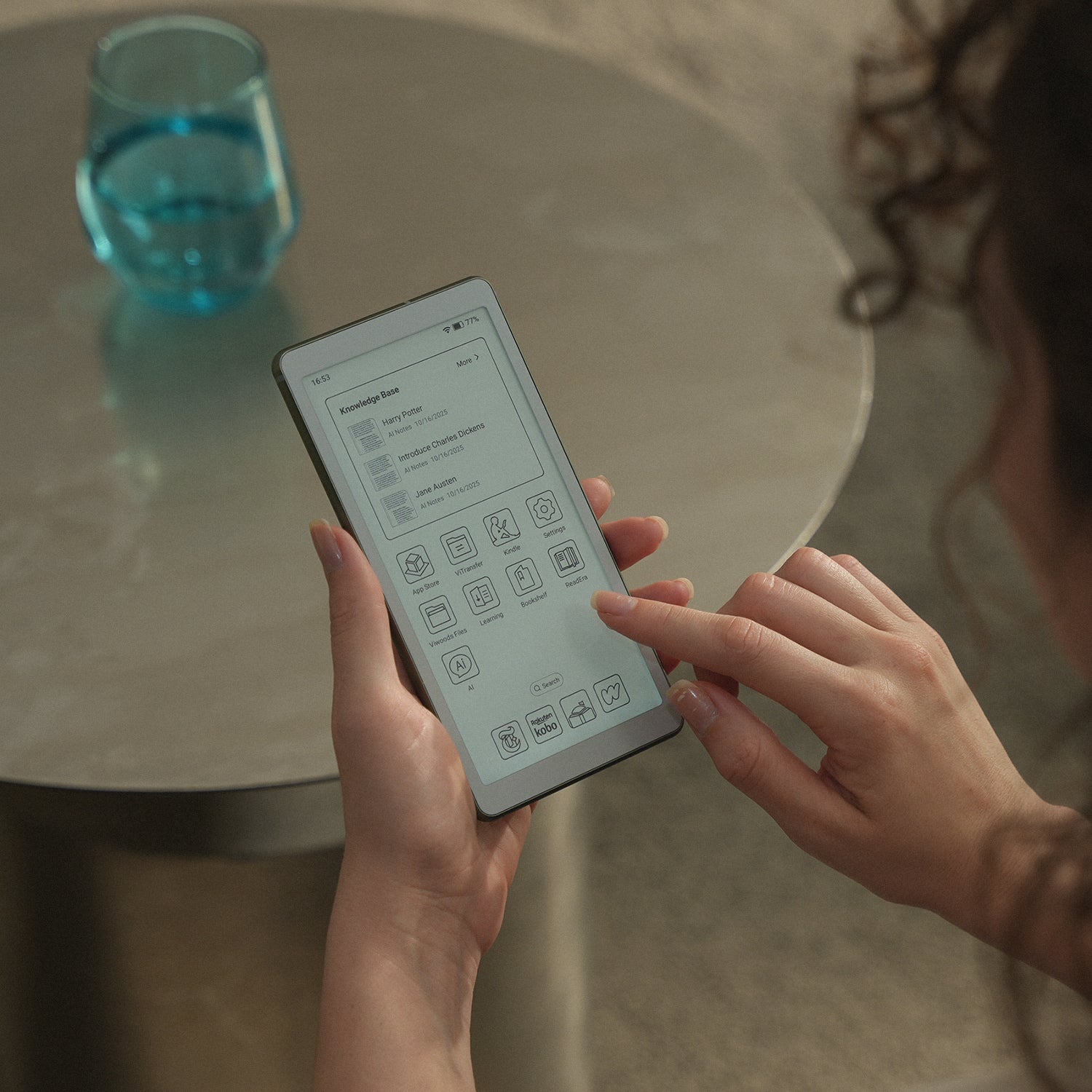
Device Fit
Choose E Ink for Reading; Choose a Tablet for Broader Media Work
An E Ink reader does not need to beat a regular tablet at every task. The useful comparison is narrower: which screen and operating style better support the work you repeat most often?
An Android E Ink Reader Fits
- Books, essays, newsletters, and long saved articles
- Reading sources spread across several apps
- Commute, travel, library, café, and evening reading
- Quick context without leaving the reading device
A Regular Tablet Fits Better
- Video, gaming, animation, and color-heavy media
- Fast switching between complex productivity apps
- Detailed image editing or design work
- A single device intended to replace a laptop
Selection Guide
Choose by the Reading Friction You Want to Remove
Feature lists can make every device look capable. A better decision begins with the repeated problem. Is reading scattered across apps? Do difficult passages send you to a phone? Does a bright tablet make long sessions harder to sustain? The strongest purchase solves the problem that appears every week.
| Your Repeated Problem | Useful Capability | Practical Result |
|---|---|---|
| Books and articles live in different places | Android reading apps, browser access, and cloud files | Less transferring and fewer reasons to reopen a laptop |
| Dense passages break concentration | Short, on-device AI explanations | Quick context followed by a return to the original page |
| Reading happens during travel or short breaks | Compact 138 g body and optional 4G connectivity | A reading queue that remains available beyond the desk |
| Bright screens encourage constant switching | Paper-like E Ink display and a curated app setup | A more deliberate environment for long-form text |
Before buying, list the five places your reading comes from.
When most of them can stay inside one focused device, app freedom has practical value. When nearly everything already lives in one closed ebook library, a simpler reader may be enough.
Common Questions
FAQ
What makes an Android ereader different from a standard ebook reader?
A standard ebook reader often centers on one store or a limited set of reading tools. An Android ereader can support a broader mix of book apps, saved-article services, browsers, cloud storage, and dictionaries. The benefit is greater access, although the app selection should remain focused to preserve a calm reading environment.
Is E Ink better than a regular tablet for long reading?
E Ink is usually the more focused choice for books, essays, and long text sessions. A regular tablet is more capable for video, color media, gaming, and fast multitasking. The better device depends on whether reading or broad media work is the main job.
How should AI be used during serious reading?
Use AI for narrow questions: defining a term, clarifying a reference, adding brief background, or restating a difficult sentence. The answer should help you return to the original text. It should not replace the author’s full argument or your own evaluation.
Who is AiPaper Reader best suited for?
It suits readers who move between books, saved articles, web pages, newsletters, and cloud files. It is also a practical fit for commuting, travel, study, and quiet evening reading when quick AI context and flexible app access matter more than video or heavy multitasking.
Does app freedom make an E Ink reader distracting?
It can, when the device is set up like a phone. The more useful approach is to install only reading-related tools and keep the first screen simple. App freedom should remove barriers between reading sources, not introduce a new stream of interruptions.
A Quieter Reading Route
Keep reading sources, quick context, and long-form focus in one place.
AiPaper Reader is designed for readers who need more flexibility than a closed library without returning to the noise of an ordinary tablet.
Guides 紙のような書き心地のタブレット
E Ink Tablet for Training and Onboarding: Manuals, Notes and Knowledge Capture
How to Evaluate an E Ink Tablet Demo for a Business Team
E Ink Tablet for Compliance Audits: Checklists, Evidence Notes and Follow-Up
Fabric vs Leather Tablet Case: Which Material Fits Daily Carry?
How to Carry a Paper Tablet and Stylus Together Without Damaging the Screen
How to Protect an E Ink Tablet in a Backpack
Paper Tablet Accessories Checklist: What You Need for Daily Carry
EMR Stylus Troubleshooting: Why Strokes Skip, Offset or Fail to Register
How to Clean an E Ink Tablet Screen Safely: A Practical Care Guide

Viwoods AiPaper
$549.00

Viwoods AiPaper Mini
$429.00

Viwoods AiPaper Reader カラー
$289.00

Viwoods AiPaper Reader
$279.00